Describe your vision. See a design. AgSci builds and runs the app.
Give your AI agent the AgKit.io catalog and a short description of your work. The agent writes a work order and a design. Following are a few examples.
I'm an independent agronomist with 35 growers and one scout. I soil sample, scout, and send prescriptions to each grower's retailer. Growers and landlords want to see their own fields. I work from my phone in the truck. Earth greens and clay, map first.
- catalog_lookup("composition")
- catalog_lookup()
- catalog_lookup("work_order_format")
- catalog_lookup("access_model")
- catalog_lookup("workflow_grammar")
- catalog_lookup("clients")
- catalog_lookup("workflows")
- catalog_lookup("products")
- catalog_lookup("notifications")
- catalog_lookup("SharedAccessPass")
- catalog_lookup("agent_access")
- catalog_lookup("integration_record")
- catalog_search("offline")
- catalog_search("mobile")
- validate_work_order(…)
A valid work order generates a bill of materials
- 10 parts that already exist in AgKit.io
- 6 new parts, generated to your specification
- 7 screens in your design
All rendered so the AgKit.io code factory can assemble your app.
prospect:
  organization_type: independent agronomist
  problem_statement: >
    I'm an independent agronomist with 35 growers and one scout. I soil sample, scout,
    and send prescriptions to each grower's retailer. Growers and landlords want to see
    their own fields. I work from my phone in the truck.
  users:
    - agronomist: owns all 35 grower records, plans sampling, reviews scouting, writes and sends prescriptions
    - scout: takes assigned scouting and sampling stages and records observations in the field
    - grower: sees their own farms, fields, soil results, scouting reports and prescriptions
    - landlord: sees only the farms or fields they own, read-only
    - retailer: receives the prescription for one job and reads the fields it covers
foundation:
  tier: I
  hierarchy_extensions:
    - soil samples under field, with sample points and lab results
    - scouting observations under field, with location, photos, pest and severity
    - prescriptions under field, with rate zones, product and rate
  access_model: >
    One organization, the agronomist's, owns every client. The agronomist is administrator
    and the scout is staff, so both see all 35 growers. Each grower is a client-side user
    and sees their own client only. Each landlord holds a read-only shared access pass on
    the farms or fields they own, invited by email link. Each retailer contact holds a
    read-only pass on the fields of one prescription job, ended on a date.
modules:
  - name: organizations
    purpose: The agronomist's one-organization tenant with two staff, agronomist and scout
  - name: contacts
    purpose: Growers, landlords and retailer contacts, with or without a login
  - name: clients
    purpose: 35 growers with their farms, fields and boundaries, and passes for landlords and retailers
  - name: workflows
    purpose: Sampling, scouting and prescription jobs run as projects on a field
  - name: products
    purpose: The agronomist's services, such as grid sampling, scouting visit and prescription, as stage steps with their data forms
  - name: soils
    purpose: SSURGO soil map units on each field map, as context for sampling and rate zones
  - name: crop_history
    purpose: Past crops on each field, as context for scouting and recommendations
  - name: data_gateway
    purpose: CLU boundaries to start a field and the NWS forecast at a field
  - name: notifications
    purpose: Tell the scout of assigned work, the agronomist of finished stages, and growers of new results
  - name: agent_access
    purpose: Let the agronomist ask questions of the records from the truck, in conversation
data_sources:
  - name: SSURGO
    used_for: Soil types under each field, shown on the map and used to place samples and zones
  - name: CDL
    used_for: Crop history for each field
  - name: CLU
    used_for: Starting boundary for a field that has none drawn
  - name: NWS
    used_for: Forecast at a field when planning a scouting or sampling day
  - name: prospect-supplied
    used_for: Current grower list, field boundaries and past soil test results
  - name: prospect-supplied
    used_for: Soil lab results for each sample
workflows:
  - name: soil sample to results
    trigger: The agronomist starts a project on a field, or a schedule starts it when a field's last test comes due
    steps:
      - plan sample points on the field map: agronomist
      - pull samples and record points: scout
      - ship to lab and enter or receive results: agronomist
      - review results and release to grower: agronomist
    outputs:
      - soil sample and lab result records on the field
      - soil test report
      - notification to grower
  - name: scouting visit
    trigger: The agronomist starts a project on a field, or a weekly schedule starts it in season
    steps:
      - walk the field and record observations with photos and location: scout
      - review, a checkpoint with outcomes no action, revisit or prescribe: agronomist
    outputs:
      - scouting observation records on the field
      - scouting report
      - notification to grower
  - name: prescription to retailer
    trigger: A scouting review ends in prescribe, soil results are released, or the agronomist starts it on a field
    steps:
      - write the prescription with zones, product and rate: agronomist
      - grower approval, a checkpoint with outcomes approved or returned: grower
      - send to the grower's retailer with a read-only pass on the fields: agronomist
      - confirm applied: agronomist
    outputs:
      - prescription record on the field
      - prescription document and file sent to the retailer
      - notification to grower and retailer
outputs:
  reports:
    - soil test report: grower and landlord
    - scouting report: grower
    - prescription sheet: retailer and grower
    - season summary by field: grower and landlord
  apis_consumed_by:
    - phone-first reactive frontend
  agent_tasks:
    - list fields with no soil test in three years: agronomist
    - draft a season summary for a grower or a landlord: agronomist
    - find who has access to a field and why: agronomist
design:
  users_and_devices:
    - agronomist: phone, in the truck and in the field
    - scout: phone, in the field
    - grower: phone or desktop, at home or in the cab
    - landlord: phone or desktop, at home
    - retailer: desktop, at the office
  look: Earth greens and clay, plain and practical
  first_screen: A map of the user's own fields, with open work marked on each field
  screens:
    - map: all fields the user can see, colored by open work, with soil and crop history layers
    - field: boundary, soils, crop history, samples, scouting and prescriptions for one field
    - my work: stages assigned to me, nearest field first
    - scouting entry: one-thumb form with photo, location, pest and severity
    - sample entry: sample points on the map, tapped as they are pulled
    - prescription: zones, product and rate, with approve and send
    - grower and landlord view: own fields on the map, with reports, read-only
production_gap:
  integrations_to_wire:
    - existing_data: import of the grower list, field boundaries and past soil tests from spreadsheets, shapefiles or KML
    - third_party_services: the soil lab, for results by file or by its service
    - third_party_services: email out, for prescriptions and share links
  data_migration: From the agronomist's current spreadsheets, boundary files and lab reports
  scale_and_security: One organization, two staff, 35 clients, and outside viewers by client login or pass. Phone use with weak signal in the field.
  operations: AgSci-managed deployment, scaling, maintenance
  leadership: CTO-level architecture and roadmap ownership (optional)
confidence:
  covered_by_catalog:
    - organization, staff and access for agronomist and scout
    - client, farm and field hierarchy with boundaries
    - grower view of own client
    - landlord and retailer access by shared access pass
    - workflows, stages, checkpoints, schedules and assignment
    - services and tasks as steps with collected data
    - SSURGO soils and CDL crop history on the field
    - CLU boundaries and NWS forecast
    - notifications in app and by email
    - agent access through MCP
  needs_new_module:
    - soil sampling module, sample points and lab results under field
    - scouting module, observations with photos and location under field
    - prescription module, zones, product and rate under field, with a document and file for the retailer
    - soil lab results import
    - reports for soil test, scouting, prescription and season summary
    - phone-first map frontend in earth greens and clay
The design. Open it and sign in as each role.
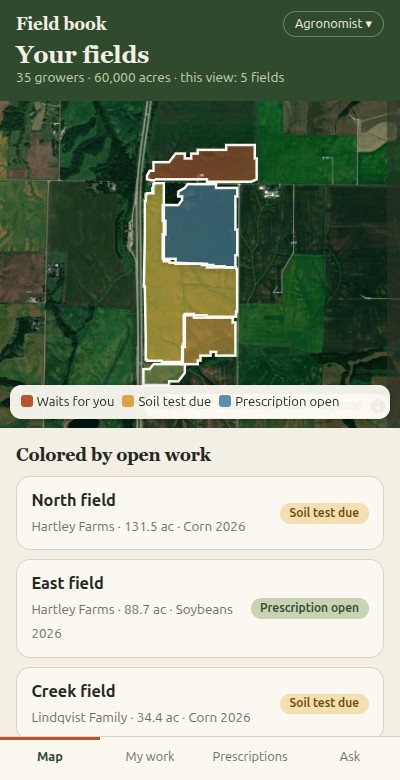 Independent agronomist Opens in a new tab. Open the design
 Two changes. The retailer records what was applied, not me. And landlords get their season summary once a year without my asking.
The agent revises the work order. Valid on the first try.
- Retailer records the application. The last stage of the prescription workflow now belongs to the retailer, not you. They enter date, product, rate and area, and you and the grower are notified when it is recorded.
- Retailer access. Their pass is no longer read-only. The build lets them fill in their own assigned stage and change nothing else, and they get a job screen with a short form.
- Application records. These are a new record under each prescription, visible on the field and included in the season summary.
- Landlord summary runs itself. A yearly schedule, on a date you set once, assembles each landlord's summary for their own land and sends it by email and to their view. You get a record of what was sent.
- 10 → 11 parts that already exist
- 6 → 9 new parts
- 7 → 8 screens
No review before sending. I took "without my asking" to mean the landlord summary goes out with no review by you. If you want to see it first, I'll add a review stage.
Your turn
The discovery process used to be expensive and frustrating. Now you can work with your AI agent to get exactly what you want.
Paste this prompt into your agent. Email the result to info@agkit.io.
Read https://agkit.io/build/llms.txt?src=starter and the catalog it links to. Then turn my problem into an AgKit.io work order, and work with me to produce a design.

My problem: <who you serve, what you do for them, how you want it to look>
No AI agent? Email your requirement to info@agkit.io. We send you design ideas, free.